



Navigacija
Lista poslednjih: 16, 32, 64, 128 poruka.

Info o izvrsenom procesu?

[es] :: Linux :: Info o izvrsenom procesu?

[ Pregleda: 652 | Odgovora: 5 ]

Postavi temu Odgovori

Autor

Pretraga teme: Traži
Markiranje Štampanje RSS

Divjak
Vladimir Divjak

Član broj: 4783
Poruke: 535
77.46.231.*


Profil

icon Info o izvrsenom procesu?15.07.2007. u 23:15

Da li je moguće na neki način saznati informacije o izvrsenom procesu (vreme trajanja, količina korišćenje memorije, povratna vrednost)

Hvala!
And don't be mad at me for crying for humanity,
call it pretensions but I got good intentions,
to keep my sanity, I'm hoping, fuck, there's gotta be
an answer to their strategies and their evil inventions... ~Looptroop
15.07.2007. u 23:15 

Jbyn4e
Admin/Developer, Yunix
Zrenjanin - Beograd

Član broj: 422
Poruke: 3107
*.ptt.yu.

ICQ: 10450578
Sajt: bio sf.co.yu


Profil

icon Re: Info o izvrsenom procesu?16.07.2007. u 05:35
Ako stavis proces u shell script, mozes pre i posle njega staviti date komandu pa videti razliku, staviti ispisivanje staja memorije pre i posle procesa, preusmeriti to u neki log fajl pa videti sta si dobio. Da li to moze nekako drugacije - ne znam, nije me interesovalo.
16.07.2007. u 05:35 

Džeronimo

Član broj: 101777
Poruke: 308
*.adsl-1.sezampro.yu.


Profil

icon Re: Info o izvrsenom procesu?16.07.2007. u 06:54
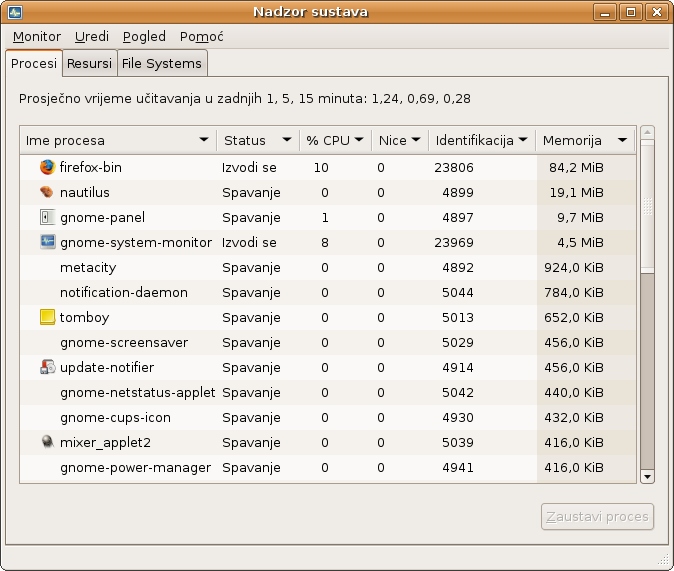
Je l' misliš na nešto ovako:


Ako na to misliš, to ima u Gnome radnom okruženju pod System > Administration > System Monitor
Prikačeni fajlovi
16.07.2007. u 06:54 

Divjak
Vladimir Divjak

Član broj: 4783
Poruke: 535
77.46.231.*


Profil

icon Re: Info o izvrsenom procesu?16.07.2007. u 07:00
Pa ne baš...
Mislio sam kada ja npr. napišem dva programa pa hoću da vidim koji brže radi...
Da li nekako mogu videti neku statistiku o njihovom izvršavanju?

And don't be mad at me for crying for humanity,
call it pretensions but I got good intentions,
to keep my sanity, I'm hoping, fuck, there's gotta be
an answer to their strategies and their evil inventions... ~Looptroop
16.07.2007. u 07:00 

caiser
Karadzic Miljan
sys-admin wannabe
Brno

Član broj: 4677
Poruke: 2461
*.de.ibm.com.

ICQ: 162962030
Sajt: www.miljan.org


Profil

icon Re: Info o izvrsenom procesu?16.07.2007. u 07:36
Probaj time komandu.

Code:
[ home src ] # time ls /
bin  boot  dev  etc  home  lib  lost+found  media  misc  mnt  net  opt  proc  root  sbin  selinux  service  srv  sys  tmp  usr  var

real    0m0.030s
user    0m0.000s
sys     0m0.004s


Code:
NAME
       time - time a simple command or give resource usage

SYNOPSIS
       time [options] command [arguments...]

DESCRIPTION
       The  time command runs the specified program command with the given arguments.  When command finishes, time writes
       a message to standard error giving timing statistics about this program run.  These statistics consist of (i)  the
       elapsed  real  time  between  invocation  and  termination,  (ii)  the user CPU time (the sum of the tms_utime and
       tms_cutime values in a struct tms as returned by times(2)), and  (iii)  the  system  CPU  time  (the  sum  of  the
       tms_stime and tms_cstime values in a struct tms as returned by times(2)).

16.07.2007. u 07:36 

Divjak
Vladimir Divjak

Član broj: 4783
Poruke: 535
77.46.231.*


Profil

icon Re: Info o izvrsenom procesu?16.07.2007. u 14:19
Hvala, na ovo sam mislio... (očigledno ne samo na ovo, ali što se tiče vremena)
And don't be mad at me for crying for humanity,
call it pretensions but I got good intentions,
to keep my sanity, I'm hoping, fuck, there's gotta be
an answer to their strategies and their evil inventions... ~Looptroop
16.07.2007. u 14:19 

[es] :: Linux :: Info o izvrsenom procesu?

[ Pregleda: 652 | Odgovora: 5 ]

Postavi temu Odgovori

Navigacija
Lista poslednjih: 16, 32, 64, 128 poruka.